
- Domains
- Domain search
- Your account
- Our services
- Partnership
- About


No interruptions, no stress, and no loss of Google rankings – that's migration to Domeny.tv. We will take care of migrating domains, databases, email, and CMS systems (e.g., WordPress), set up redirects, check meta tags and the sitemap, and report changes in Google Search Console. We do the entire process for you, free of charge, and you can get up to 6 months of additional hosting to start with.

Every migration is an opportunity for business growth. Your website will benefit right from the start. You improve performance and streamline the functioning of your website. Weaker hosting and older solutions can hinder business growth and weaken website traffic. Implementing better infrastructure means shorter page loading times and makes it easier for search engines to index content. The result? Better SEO and more stable operation in the long term.

We offer two server lines to choose from: Business (lots of space on SSD drives) and Ultra (NVMe drives, modern AMD EPYC™ class CPUs). Data centers in Poland reduce response times and support SEO.

We perform a full-service transfer: a copy of websites, databases, and email. We transfer domains and their configuration, all at a time convenient for you.

You get a 50% discount for the first year of hosting service. We provide favorable prices for renewals and maintenance of your domains.

If you have a service with another provider, you'll get up to 6 months of access to our services free of charge.

Each of your domains and subdomains will immediately receive a free SSL certificate from Let's Encrypt. The system will generate and install it itself, making your website secure without any additional configuration.

By moving your website to Domeny.tv MSERWIS, you gain access to our proprietary online WordPress course and the full version of the GeneratePress Premium template (worth $59). With this practical set, you can launch and refine the look of your website faster. Just starting your business? Then your new website will look great right away.

Daily backups (up to 14 days back), automatic SSL certificates (Let's Encrypt) for every domain and subdomain, and Imunify antivirus.

At Domeny.tv, your website will get a real speed boost. Our hosting services are efficient, and modern drives and fast server response times guarantee smooth operation of your website or store, even with high traffic.

Contact us in the way that is most convenient for you: by phone, live chat, or email. We respond to chat messages in less than a minute on average, so you will receive help almost immediately.

cPanel is a comprehensive and extremely convenient server management panel. It allows you to easily control your email accounts, domains, databases, and PHP versions. You have full control over the most important elements of hosting – from website configuration to security and performance. All features are available in one place, in a clear and intuitive interface.

Join our affiliate program and earn money by recommending Domeny.tv services. You will receive a commission for every person who uses your link and purchases hosting. You will also receive a commission in subsequent years, as long as the customer you referred uses the services. It's an easy way to support our customers and earn real money online every year.

Manage all your WordPress sites from one convenient dashboard. With WordPress Toolkit Premium, you can quickly install, update, and secure your sites without having to log in to each one individually. You save time and have full control over all your projects in one place.

Do you have an unusual problem with your website or need custom solutions? Get help from our experienced developers. Assign them a one-time task or a longer project. We will tailor the scope of work to your needs.

For many years, we have been supporting our clients in building and developing their online presence. We perfectly understand the needs of companies and individuals, which we can select solutions that really work. Our experience guarantees stability, security, and effective support at every stage of cooperation.

Sign up for our newsletter to stay up to date with the latest promotions. Be the first to receive information about discounts on domains, hosting services, and additional services. This allows you to take advantage of offers available exclusively to subscribers.

If you need an individual approach and advanced technical support, choose VIP service.

Contact us before placing your order
To successfully transfer your websites and other resources, write to our team and tell us what hosting service you need. We will select a server service tailored to your website's load and ask you for access data to your current infrastructure. Based on this, we will check the technical requirements of the website (traffic, database, technologies used, etc.).

Order a server
When placing your order, select the option “Free transfer of a website from another hosting provider”, and then pay for the new hosting service. This will allow us to reserve our administrators' time for transferring your email and website.

We determine the scope and deadline
We will agree on which elements are to be transferred (websites, databases, email accounts, etc.). Together, we will choose a deadline for the service to minimize any downtime.

Copying and testing
We will copy all the agreed services and check that everything works correctly in the new environment. We will also help you change your domain's DNS records so that traffic is directed to the new server.
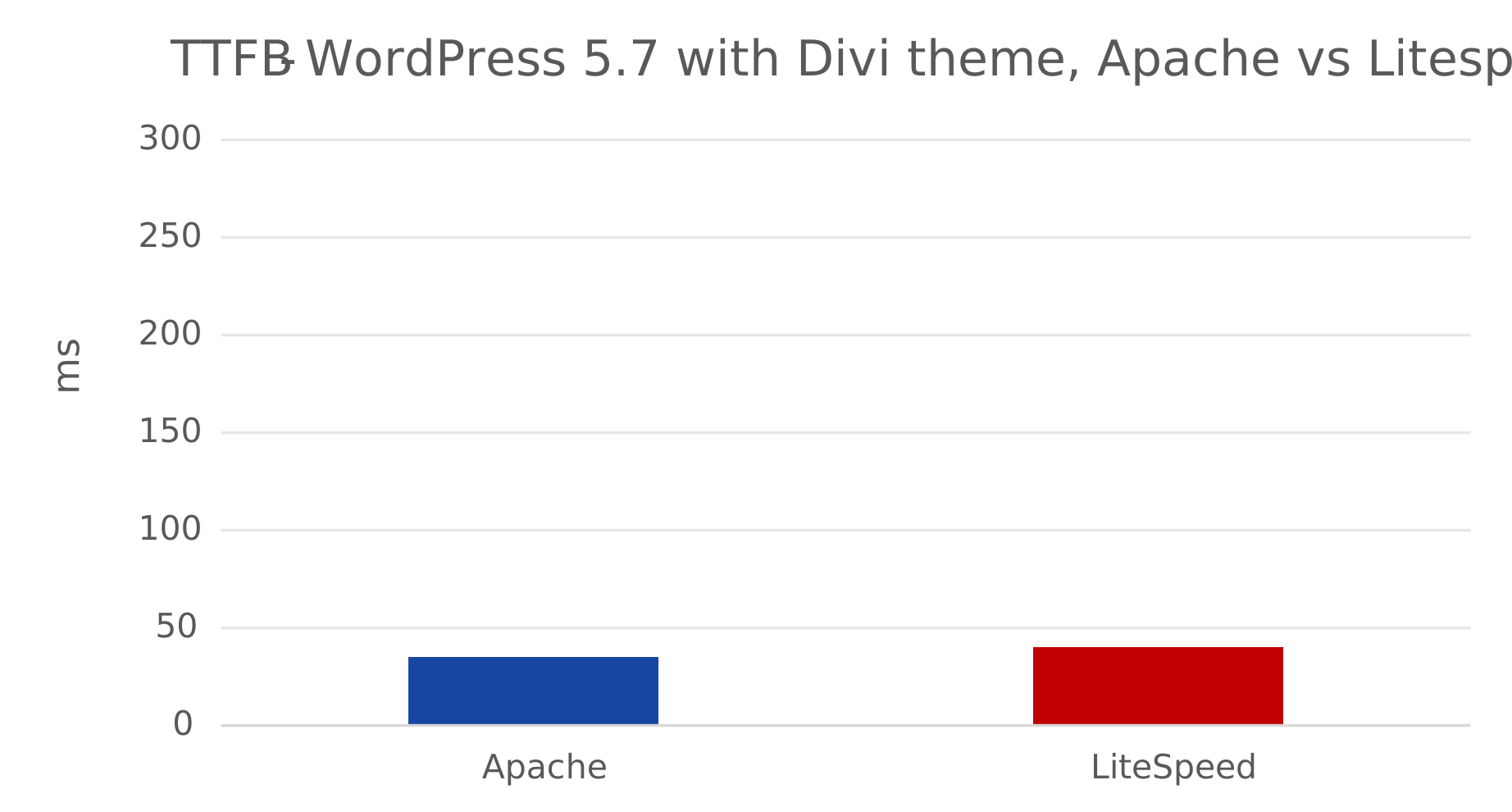
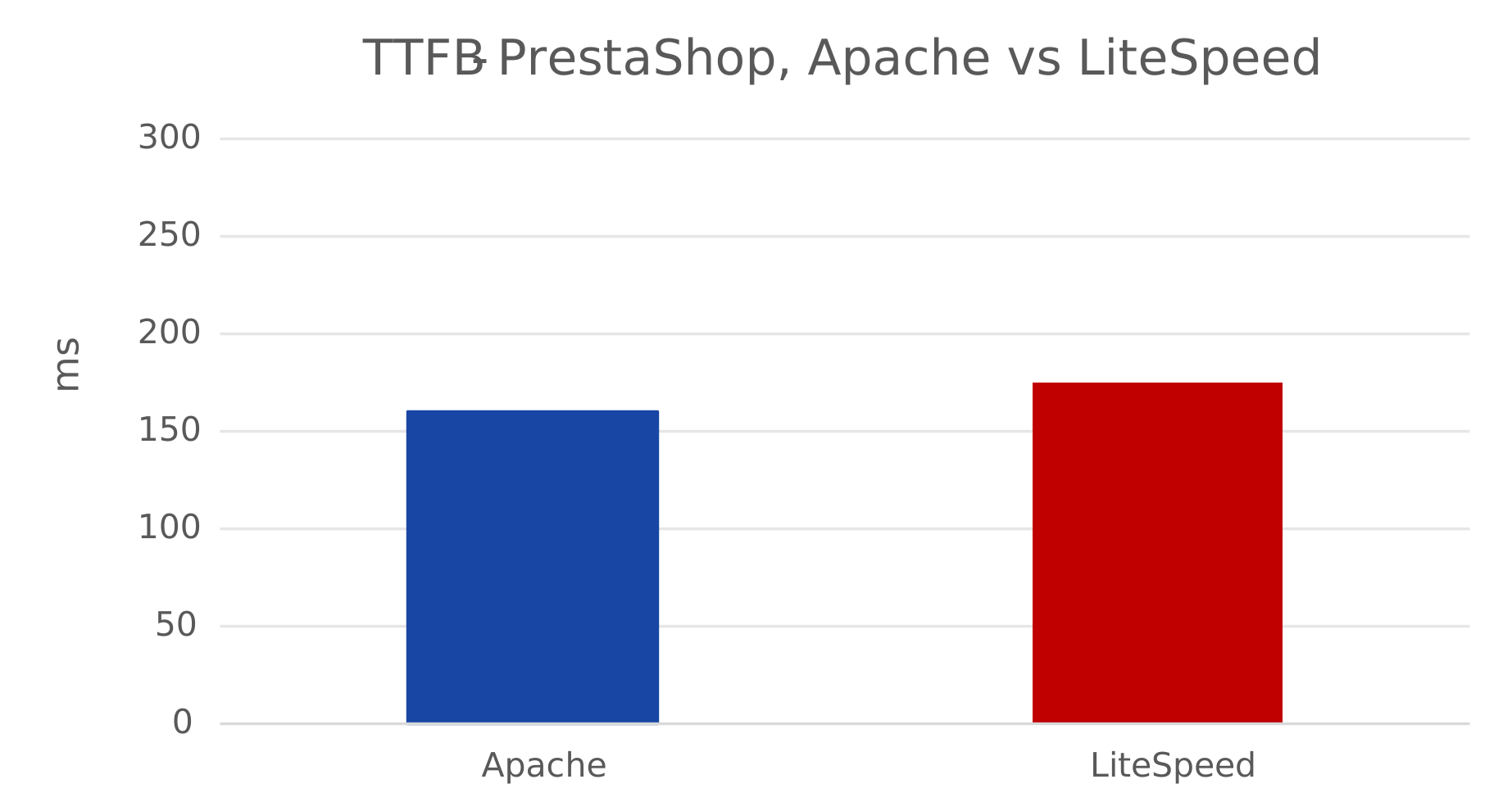
On our blog, we presented the results of tests carried out using various online tools. Thanks to them, we can prove that Domeny.tv MSERWIS servers based on Apache with the mod_lsapi module ensure high performance for websites running on PrestaShop and WordPress. During the tests, we measured the server response time (TTFB), a key indicator affecting the loading speed of a website. TTFB shows how long the browser waits for the first response from the server, thus realistically reflecting the performance and optimization of the website. The lower the TTFB, the faster the website works and the better Google ranks it in search results.
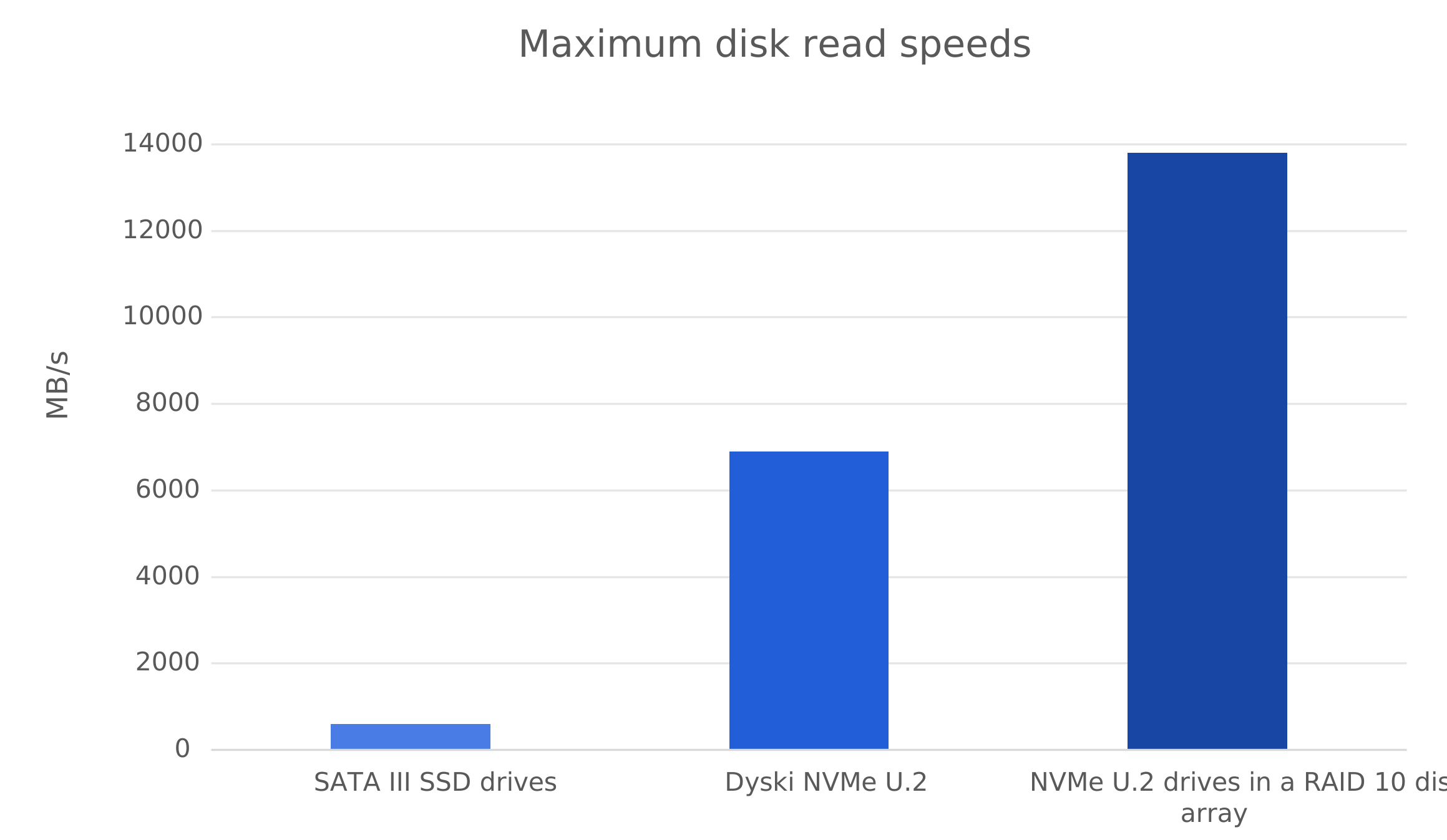
In our Ultra line servers, we use NVMe drives in a RAID 10 array, which achieves read speeds of up to 13,800 MB/s. This is up to 23 times faster than standard SSD SATA III drives (approx. 600 MB/s) used in most hosting offers on the market.
Thanks to NVMe technology, the website loads faster, runs more smoothly, and provides a better user experience – which directly translates into higher rankings on Google.
Our servers have been tested using k6.io and achieved impressive results. During the test, a WordPress site with WooCommerce and an extensive graphic theme handled 4,870 full requests in 5 minutes with only 20 active users.
The Peak RPS (requests per second) reached 19.33, and the response time for 95% of requests was only 117 ms. This shows that our servers maintain stability and speed even with increased traffic.
With this kind of performance, you can be sure that your website will run smoothly, regardless of the number of visitors.

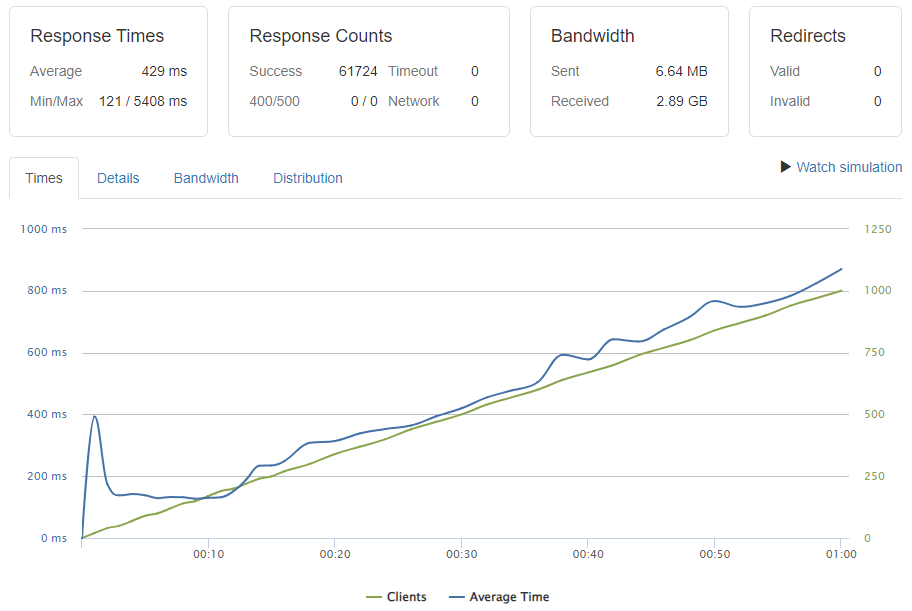
Using loader.io, we tested the performance (page speed) and behavior of Ultra hosting under increasing load. Within one minute, the number of simultaneous visits increased from 0 to 1,000 at the same time.
The average response time was only 429 ms, and the Response Counts Success rate reached an impressive 61,724, which means that all requests were handled without errors. This parameter contributes to better visibility of the website in search results.
The test confirms that Domeny.tv servers can easily handle high traffic – they maintain low latency, stability, and full website availability even under heavy load.
| Operation type | Speed | Rating |
|---|---|---|
|
Inserting records. E.g. Inserting new article, placing a new order, registering as a new customer. |
2939 / sec | Good |
|
Finding record by primary key. E.g. Finding a product by ID in an e-commerce application or an article by ID in CMS. |
9434 / sec | Good |
|
Finding an unindexed integer records with an exact match. E.g. Findind all shirts with size 40 in the e-commerce application. |
762 / sec | Good |
|
Text search. Searching for a 3-characters string inside records. E.g. Searching for all customers' names containing 'art'. |
102 / sec | Good |
|
Finding an unindexed string records with exact match. E.g. Searching for all items of a specific colour. |
588 / sec | Good |
|
Select records where integer field value * 1.23 > random number. E.g. Example: Searching for all products with a size bigger than... |
18797 / sec | Good |
|
Updating records. E.g. Updating the 'color' field - changing color in all item where color is green to blue. |
18797 / sec | Good |
For the transferred WordPress with WooCommerce website and its extensive graphic theme, we tested the database speed using the Simple DB Speed Test tool. We checked how the server handles various types of data operations – from reading to writing.
The results speak for themselves: we achieved maximum scores in all test categories, confirming the excellent performance of our databases.
With this infrastructure, you can be sure that your website will load instantly and database queries will be processed without delay — even during high traffic.
For the migrated WordPress with WooCommerce website and its complex graphic theme, we tested the database speed using the Simple DB Speed Test tool. We checked how the server handles various types of data operations — from reading to writing. We received maximum scores in all test categories, confirming the excellent performance of our databases.
This infrastructure ensures that your website loads instantly and database queries are processed without delays — even during high traffic.
| Latency time | Location |
|---|---|
| 4 ms | Poland, Warsaw (DC328) |
| 8 ms | Poland, Warsaw (DC288) |
| 9 ms | Poland, Lodz (DC78) |
| 12 ms | Poland, Gdansk (DC211) |

Bartek
CEO Wrocławskieremonty.pl
I moved my company's website and email from the previous provider. The Domeny.tv MSERWIS team carried out the migration without any downtime: they copied the files, database, and mailboxes, and kept the URLs. The new server runs faster, the hosting cost has decreased, and visibility on Google has not suffered any decline or 404 errors. I recommend them.

Dariusz
CEO AkumulatoryExpert.pl
After a drastic price increase by my old operator, I requested a transfer. Here, the domain, hosting, and SSL certificate cost less than the email alone did before. The specialists at Domeny.tv MSERWIS took care of the redirects and URL map, so I didn't notice any drop in Google search results. The process went smoothly and safely.

Maciej Dutko
CEO Evolu.pl
I have been using their services since 2016. After some adventures with other providers, I finally have stable and fast hosting here. Transferring the website to WordPress, CMS updates, and ongoing optimization always go smoothly. They respond quickly and specifically — they are number 1 for me.
We don't improvise. Each project has a specific action plan:
Planning and audit: we check the resources of the old version of the website, check the CMS (content management system) configuration, review subpages, and check the functionality of the website.
Data transfer: we prepare the environment on the new server service. The next step is to copy all files, databases, and emails.
Traffic redirection: if necessary, we configure 301 redirects, take care of addresses and site map consistency to avoid errors.
SEO verification: we check indexing, Google Search Console, and Google Analytics.
Testing and acceptance: we review key elements, every important subpage, verify forms, and finally, if necessary, help set up the CMS system.
If a domain change or information restructuring is involved, we also support you: we prepare a detailed address map so that visibility in search results does not decline.
No. The process does not cause any downtime for your website. During the data transfer, the website remains active and available to users.
The exception is online stores, which should be temporarily disabled on the old server during DNS propagation to avoid losing orders. In such a situation, we place an information page (a so-called placeholder) on the previous server, which clearly communicates that migration is in progress and everything will return to normal within a few hours.
No – email works without interruption. However, during the first few hours after the DNS change, some messages may still go to the old server, while others will go to the new one. This is normal and is related to the DNS propagation process.
Propagation is the time it takes for new DNS records to spread across the network. It usually takes from a few to 24 hours. Once it is complete, all email will be handled exclusively by the new Domeny.tv MSERWIS server.
We need access to the hosting from which we are transferring your data. You can provide us with one of the following accesses:
Access to the administration panel – provide your login and password, and our specialist will create the necessary accesses and prepare a list of items to be copied.
SSH access – covers the entire hosting account. If this access does not include email files or databases, we will also ask for separate login details for these services.
FTP and database access – provide your FTP account login and password, as well as your database login details (login, password, and phpMyAdmin address).
Website migration is the process of transferring resources to a new environment, which we will carry out as quickly as possible, at a time that suits your needs. Efficient migration while maintaining the structure of the website is our most important goal. Usually, the entire process (transferring all content) takes up to 3 business days from the moment we receive access to the resources from which we are transferring the data.
If necessary, we can also set a specific date and time to ensure full continuity of the website. You don't have to worry that a poorly executed migration could lead to problems (e.g., negatively affect SEO - website visibility in search engines), we discuss everything with you to maintain full control over the process. We check the website's functionality before and after the transfer.
An authInfo code is a unique identifier required to transfer a domain from one registrar to another. It acts as a security password – it confirms that the transfer is being requested by the domain owner.
Only the domain subscriber, i.e. its actual owner, can obtain the AuthInfo code. They submit a request for its issuance to their current registrar.
Detailed instructions on how to obtain the AuthInfo code from various registrars can be found on our website What is the AuthInfo code and how to obtain it from the registrar?
Yes, we offer the option to configure the contents of your hosting account on a VPS with minimum parameters: 2 CPUs, 4 GB RAM, and 50 GB disk space.
Such a VPS provides guaranteed resources, a dedicated environment, a higher level of security, and the ability to create custom configurations – you can choose the PHP version yourself, install additional software, or set your own host rules.
To request migration to a VPS, when placing your order, select: the initial configuration service and at least one cPanel or DirectAdmin license if you want to use the administration panel.
With these two options, our team will take care of copying all your data to the new VPS.
It is worth remembering that migration to VPS without a cPanel or DirectAdmin license is an individual service and cannot always be performed as part of the standard configuration. Therefore, we recommend choosing a VPS with a cPanel license – this is the most convenient solution that allows you to copy your data quickly, securely, and with full control over the environment.
Do you have questions? Contact our experts and find out how to best migrate your services. During a free consultation, we will answer all your questions and help you choose the best solution.
During a short conversation, we explain the planning and the entire process: URL mapping, redirects, CMS support, Google indexing control, Google Search Console and Google Analytics configuration, as well as how to update settings so that SEO visibility does not decrease.

This website uses cookies
We use cookies to personalize our content and advertisements, provide social media functions, and analyze the traffic on our website. We share information about your activity on our website with administrators of social media, online advertising, and analytics services. Partners may combine this data with other information collected from you or during your use of their services.
With your consent, we can better match our offer to your interests and preferences.
Necessary cookies are key for the proper operation of the website and enable basic functions, such as navigation and access to the safe areas of the website. Without them, our website will not function properly.
| Name | Description | Retention period | Cookie provider |
|---|---|---|---|
| PHPSESSID | User session ID | 24 hours | Domeny.tv MSERWIS |
| cookieSettings | Information about the user’s acceptance of cookies | 1 month | Domeny.tv MSERWIS |
Preference cookies allow our website to remember information and customize its appearance and functions, e.g. the user’s preferred language or region.
| Name | Description | Retention period | Cookie provider |
|---|---|---|---|
| doNotShowCartModal | Status | 24 hours | Domeny.tv |
Statistical cookies help us understand the behavior of users to better meet their needs by collecting and reporting anonymous data on the use of the website.
| Name | Description | Retention period | Cookie provider |
|---|---|---|---|
| _ga_*, _gid, _gat_* (Google GA4) | Analytics | 400 days |
Marketing cookies are used to track the activity of users on various other websites in order to display advertisements tailored to their interests, increasing the value of the advertisements, which then better match the interests of users.
| Name | Description | Retention period | Cookie provider |
|---|---|---|---|
| _gcl_au (Google Ads) | Advertising and remarketing purposes | 90 dni | |
| _fbc, _fbp (Facebook) | Advertising and remarketing purposes | 400 days | Meta (Facebook, Instagram) |
| lz_* | Komunikacja z klientami (chat) | 100 dni | Domeny.tv MSERWIS |
| polecony | Cele reklamowe, remarketing, program partnerski | 30 dni | Domeny.tv MSERWIS |
| DOMENYTV | Cele reklamowe, remarketing, mailing | 100 dni | Domeny.tv MSERWIS |
Unclassified cookies are in the process of being assigned appropriate categories, which is done together with their providers.
Cookies are small text files used by websites to facilitate their use by the users. The law permits the storage of cookies on the user’s device only when it is necessary for the operation of the website. For other types of cookies, we require your consent.
Our website uses various types of cookies. Some of them are set by third-party services available on our websites. You may revoke your consent at any time in the cookie section on our website.
More information about us, how to contact us, and how we process personal data is available in our Privacy Policy (www.domeny.tv/politykaprywatnosci). Please quote your consent ID and date when contacting us in this regard.
By clicking ‘Consent to all’, you declare that you consent to all cookies used on our Website by Domeny.tv MSERWIS Sp. z o.o., with registered office at ulica Stacyjna 1/63, 53-613 Wrocław and by third parties, i.e. Google LLC, Meta Platform Ireland Ltd., being installed on this device. Thanks to these cookies, we will be able to track your behavior on the pages of the Website and later analyze them in order to understand your way of using the Website, adjust the Website to your needs, as well as show you personalized advertisements (i.e. cookies are used for profiling). Cookies also enable us to remember your selected settings and Website interface customization. More information about the above cookies, their function, the entities installing them and purposes for their use are available in our Website Cookie Policy (www.domeny.tv/polityka-cookies).
If you click ‘Customize’, and then ‘Refuse’, we will only use the cookies necessary for the proper operation of the Website, as well as those cookies to the collection of which you voluntarily consented by selecting the relevant toggle. Note that you can always determine which specific cookies are to be installed on this end device. Giving consent (by clicking ‘Consent to all’) or adjusting settings in regard to cookie installation is voluntary. After consenting, you may always change the rules of retention or access to cookies in the browser settings on your device. Changing these settings will have no impact on the legality of processing the data collected via cookies installed before their change.
Cookies installed by Domeny.tv MSERWIS Sp. z o.o. or information collected through them may be considered personal data in certain circumstances. For such cases, the personal data controller is Domeny.tv MSERWIS Sp. z o.o. The controller may be contacted by regular mail or e-mail at info@mserwis.pl. You have the right to access your personal data, rectify, delete, transfer them, or restrict their processing, as well as a right to submit a complaint to the President of the Personal Data Protection Office. You have the right to object to the processing of your personal data. More information about the processing of personal data on the Website is available in the Website Privacy Policy.
Zaktualizuj swoją przeglądarkę, aby poprawnie wyświetlić tę stronę. / Update your browser to view this website correctly.